How do I reset my SecureMessenger password if I have forgotten it?
NOTE: This feature is only available to recipients that have set up their own passphrase. Otherwise this reset link is not displayed.
If you have received a SecureMessenger message and previously set up a passphrase, but can no longer remember it, you can reset your account passphrase.
There is a 'Forgot Passphrase' link on the login page that will allow you to reset your account hint and passphrase: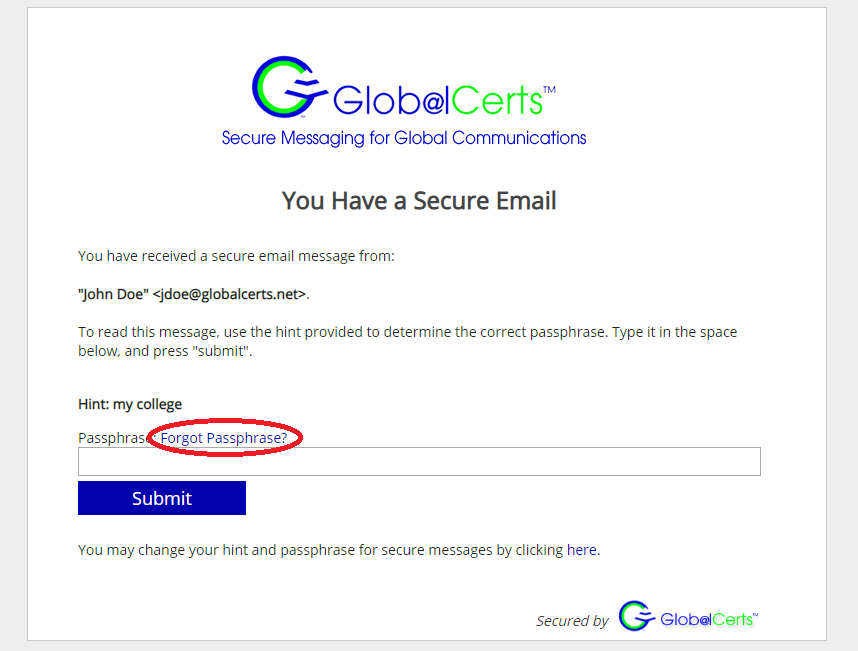
After clicking this link, you can then click on the reset you need to enter your old passphrase, or you can click 'Reset Passphrase' if you don't know it:
This will send you an email with a unique one-time link to create a new hint and passphrase:
You may close this window. Now, check your email and click on the link you receive to confirm you own the email address:
Once you click the link, enter your new hint and passphrase and Submit.
Now, you can log-in to all your old messages with the new passphrase. The hint will be updated as well:

NOTE: This feature is only available to recipients that have set up their own passphrase. Otherwise this reset link is not displayed.